PyEvoc extends the Hierarchical Evocation Method to large-scale digital corpora — reconstructing the central nucleus and peripheral structure of social representations from naturally occurring online discourse.

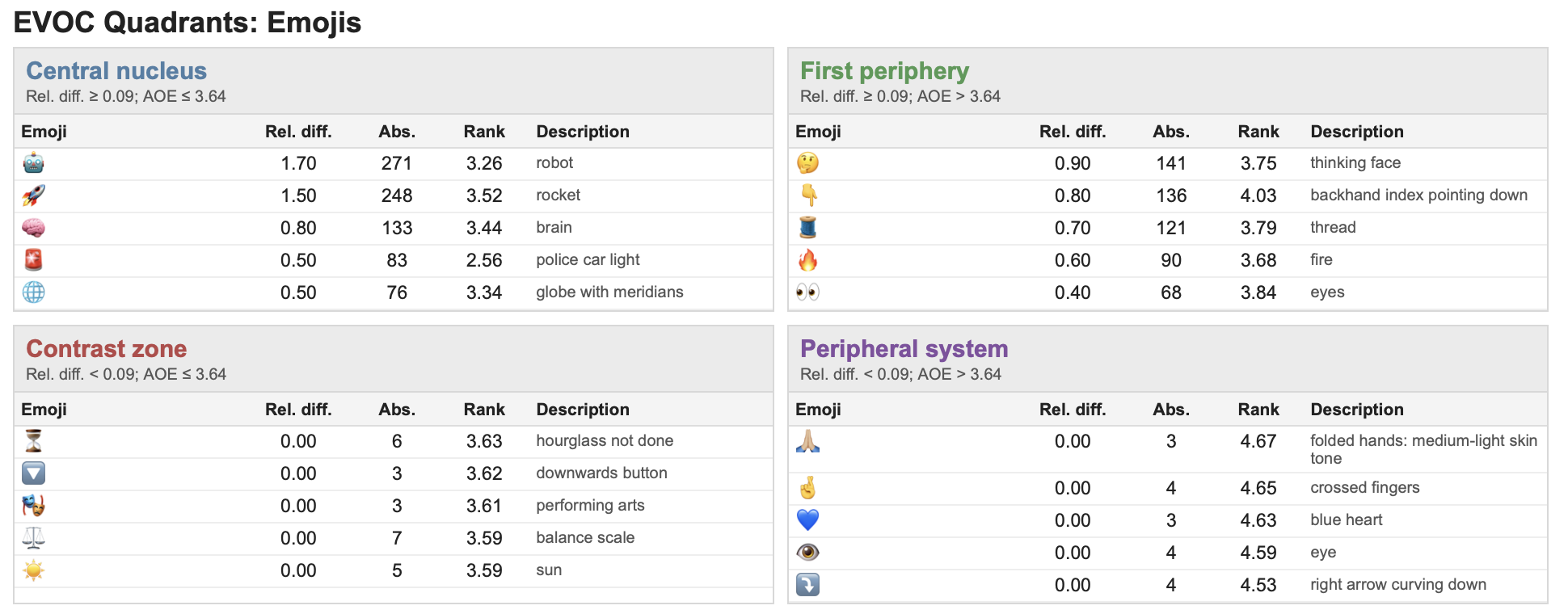
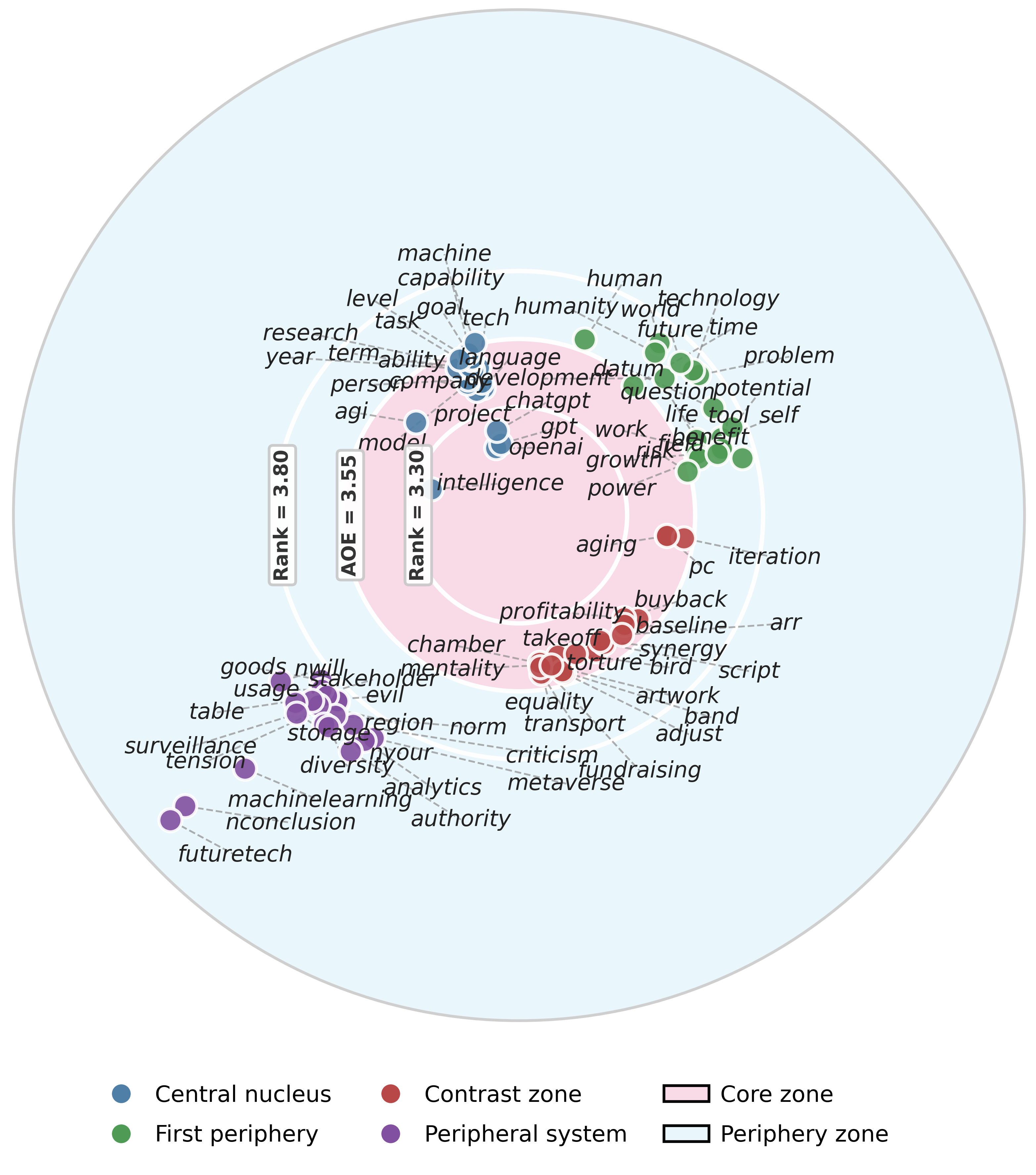
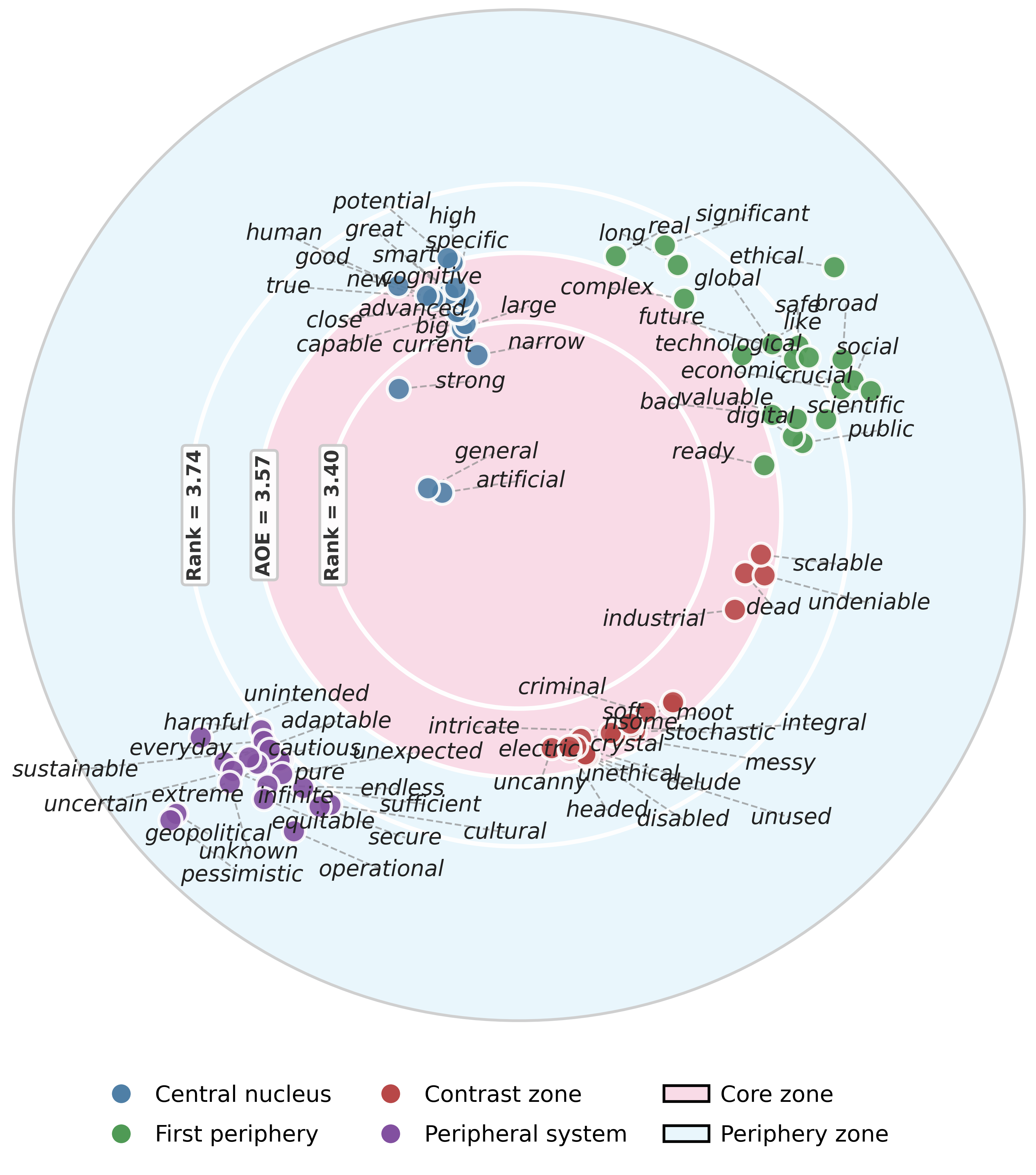
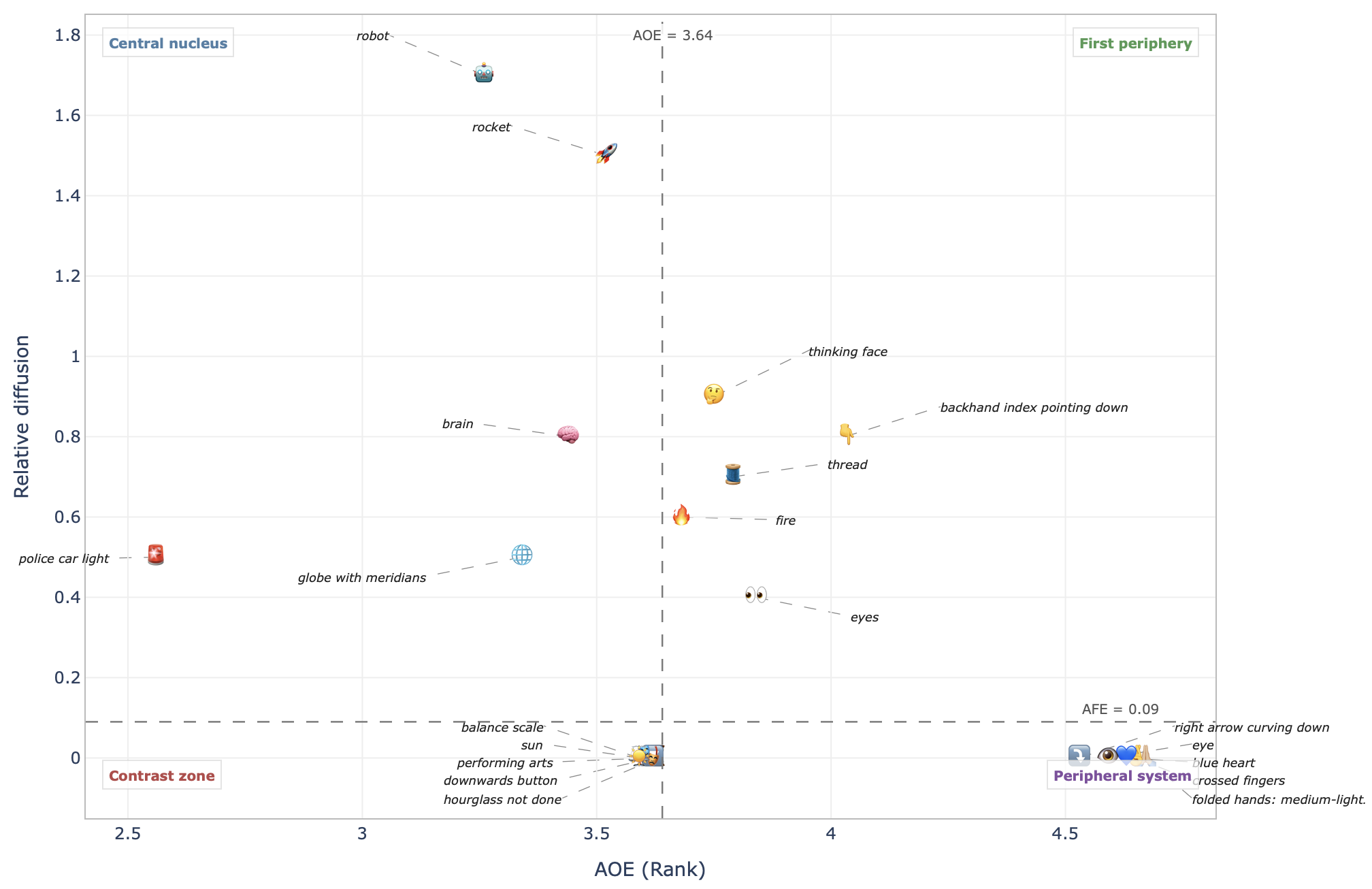
Lexical units are placed in a two-dimensional representational space defined by user-level diffusion (AFE) and discursive salience (AOE), using POS-specific thresholds computed separately for nouns, adjectives, and emojis.
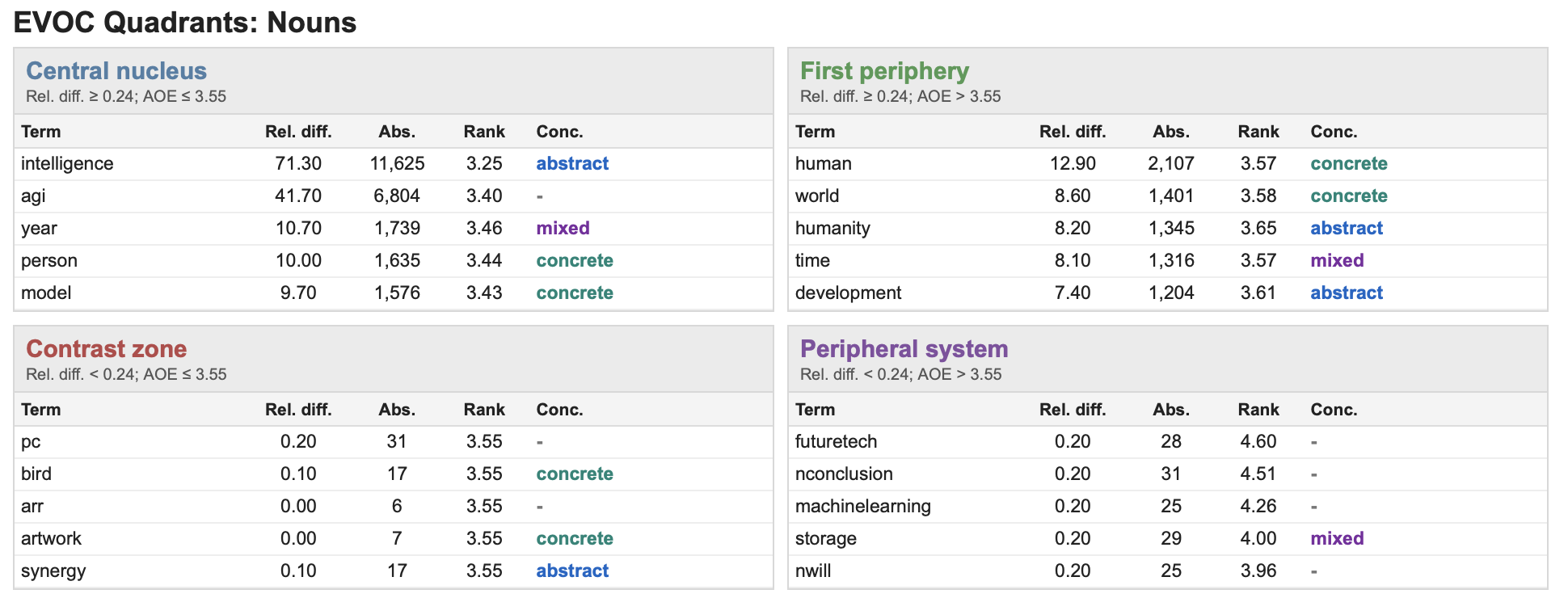
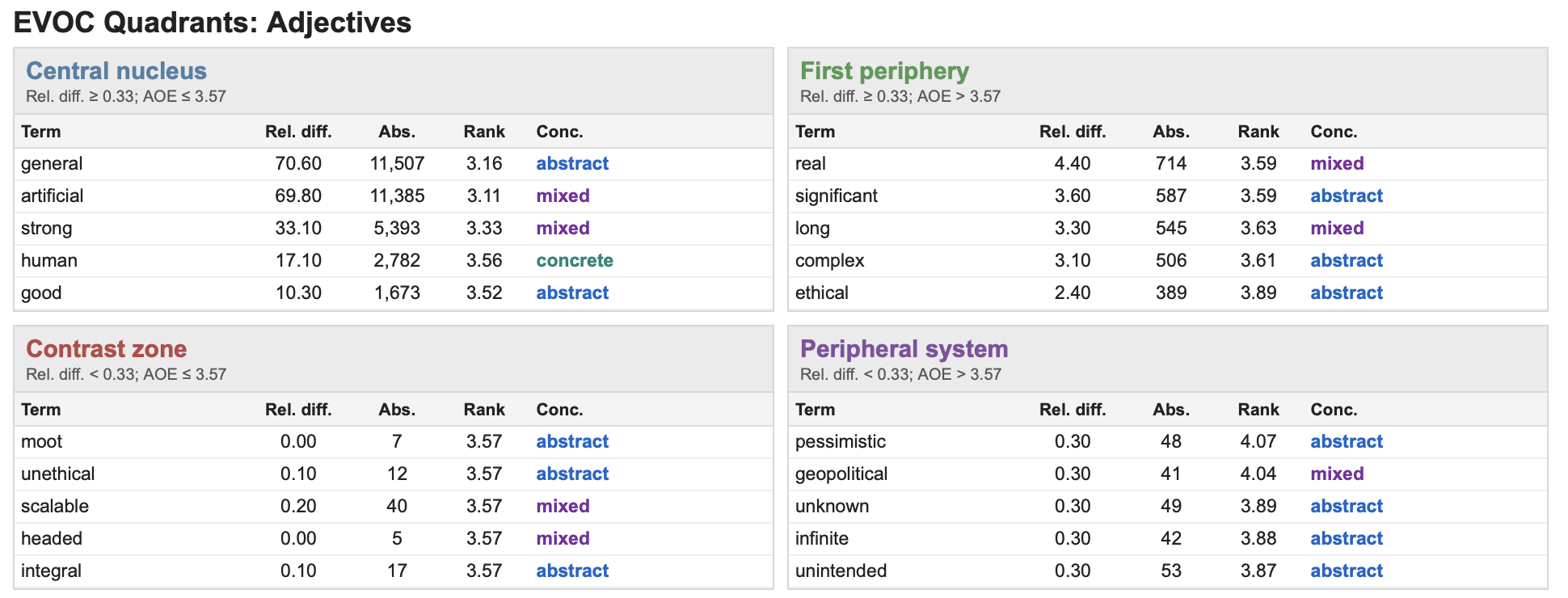
The most stable, consensual, and collectively shared representational elements. Strongly linked to collective memory, social norms, and group identity. These terms provide coherence and organisational stability to the overall representation.
Widely shared but contextually flexible elements that support adaptation to situational contingencies. They protect the stability of the central core while enabling representational evolution and contextual adjustment.
Salient but less diffused elements associated with minority positions, contested meanings, or emerging interpretative framings. Often represents heterodox viewpoints that challenge the dominant symbolic configuration.
Weakly diffused and low-salience elements characterised by contextual variability and lower representational stability. Sensitive to emerging controversies and episodic discursive activations.
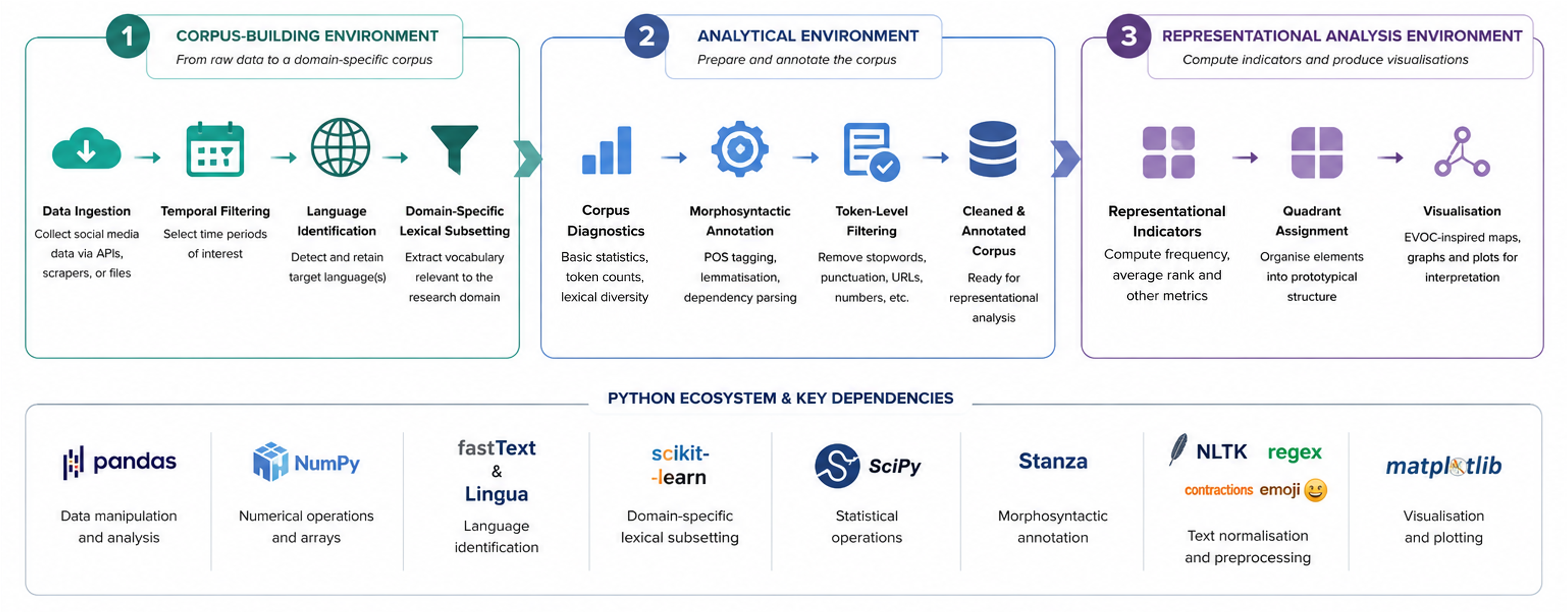
From raw social media data to publication-ready EVOC maps — every stage is modular, resumable, and parameterised.
PyEvoc requires Python 3.9+ and installs directly from GitHub. Bundled models load automatically at runtime — no separate download steps needed for most use-cases.
A pandas.DataFrame with at least four columns:
| Column | Type | Description |
|---|---|---|
| user_id | str / int | Author or account identifier |
| doc_id | str / int | Document or post identifier |
| time | datetime | Publication timestamp |
| text | str | Raw text content |
All additional source columns are preserved throughout the pipeline via DatasetConfig.
Each step exposes a dedicated config object for fine-grained control. Intermediate outputs can be saved and reloaded to resume long annotation runs.
Map source columns to the four standard names (user_id, doc_id, time, text) via DatasetConfig. Supports CSV, XLSX, TSV, Parquet, JSON. Date filtering and timezone normalisation applied here.
fastText (lid.176.bin) primary classification; Lingua secondary validator for ambiguous cases (default confidence window: 0.50–0.90). Supports English, Italian, French, German, Spanish, Portuguese.
Provide a plain-text anchor file (one term per line). First stage: regex matching with word-boundary constraints. Second stage: cosine-similarity expansion on a sparse count matrix. Optional — skip if corpus is already domain-specific.
pyevoc.preprocessing.thematic_filteringDescriptive summary: document count, token count, unique types, type/token ratio, hapax legomena rate, temporal distribution, and user/document metadata.
pyevoc.preprocessing.corpus_statisticsProduces a clean_text column. Options: lowercase, URL removal/placeholder, contraction expansion, emoji spacing, elongated vowel reduction, punctuation spacing. Progress bar available.
Stanza-based token-level annotation: UPOS tags, lemmas, dependency relations, sentence and token position. GPU support; batch size configurable. Saves Parquet for resumability.
pyevoc.preprocessing.annotationIdentifies Unicode emoji tokens and reassigns them to the EMOJI UPOS class, enabling their treatment as a distinct lexical category with separate AFE/AOE thresholds.
Computes four binary salience indicators per token: I_first (opening sentence), I_emph (emphasis), I_list (list/quote), I_intens (caps/typographic). Weights configurable via ForegroundingWeights.
Filters token table to NOUN, ADJ, and EMOJI. Applies minimum document (min_docs_per_term) and user (min_users_per_term) frequency thresholds to exclude noise terms.
Produces per-term statistics: user diffusion, composite salience rank, absolute and relative frequency. Returns POS-specific AFE/AOE thresholds and a quadrant summary table. Configurable via SalienceConfig (α, R_max, diffusion mode).
Adds concreteness labels to term_stats using the bundled English norms lexicon. Reports coverage statistics. Useful for interpreting the objectification dimension of representational structures.
Adds human-readable descriptions to emoji terms using the bundled lookup table. Falls back to standard Unicode names with fuzzy matching (configurable min_similarity) for unknown symbols.
Assigns each term to one of four zones using POS-specific AFE/AOE thresholds. Generates an HTML report (generate_html=True) with the top-N terms per quadrant per POS class.
Dependency-based bigram extraction, G² significance testing, minimum frequency/document/user thresholds. Optional NER with overlap resolution (prefer_overlap="evidence"). HTML output available.
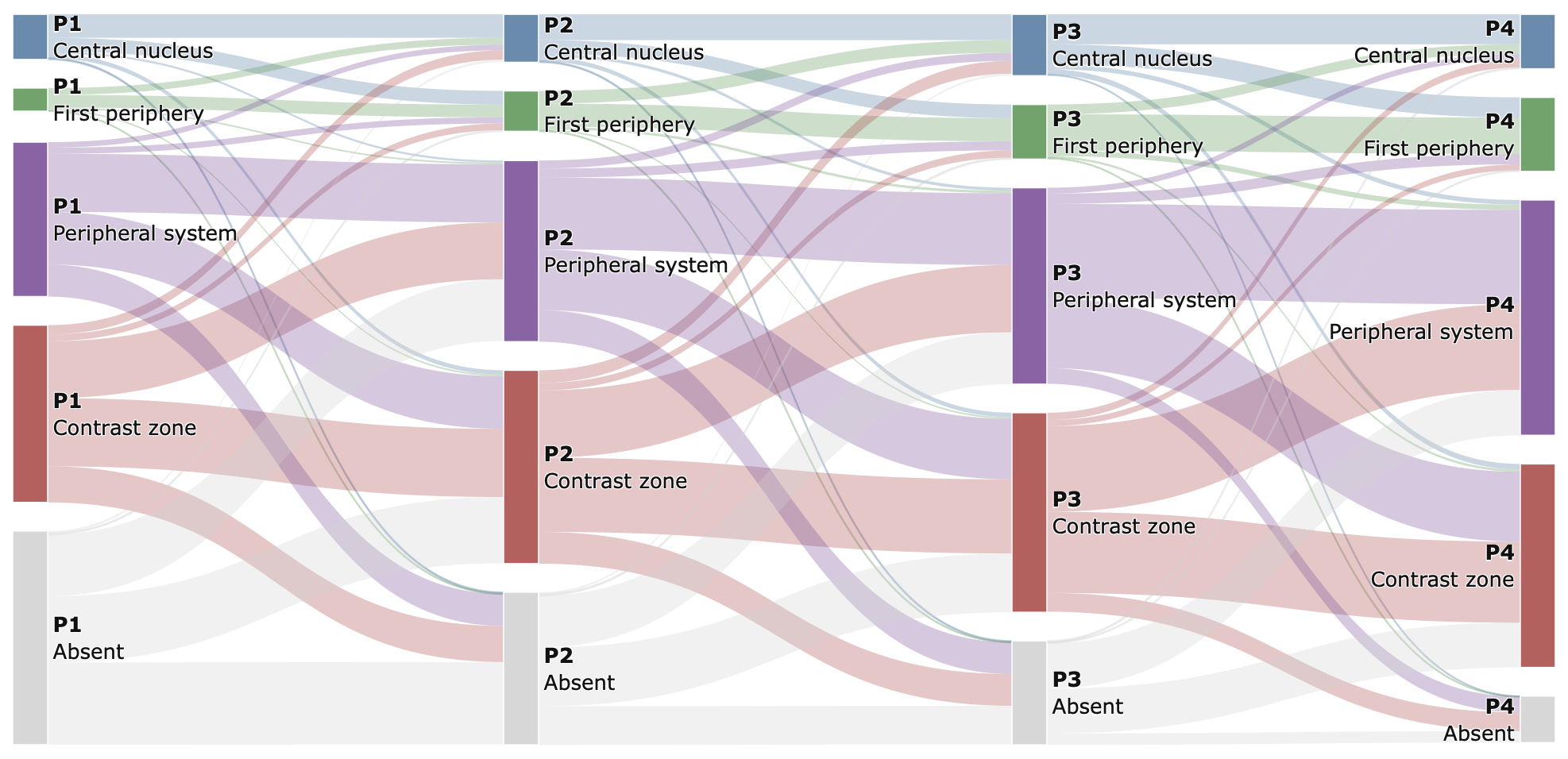
Segments corpus into periods (equal-interval or custom cuts with labels). Re-runs EVOC per period. Returns Core Jaccard similarity, Diffusion Spearman correlation, stability indices, and per-period quadrant assignments.
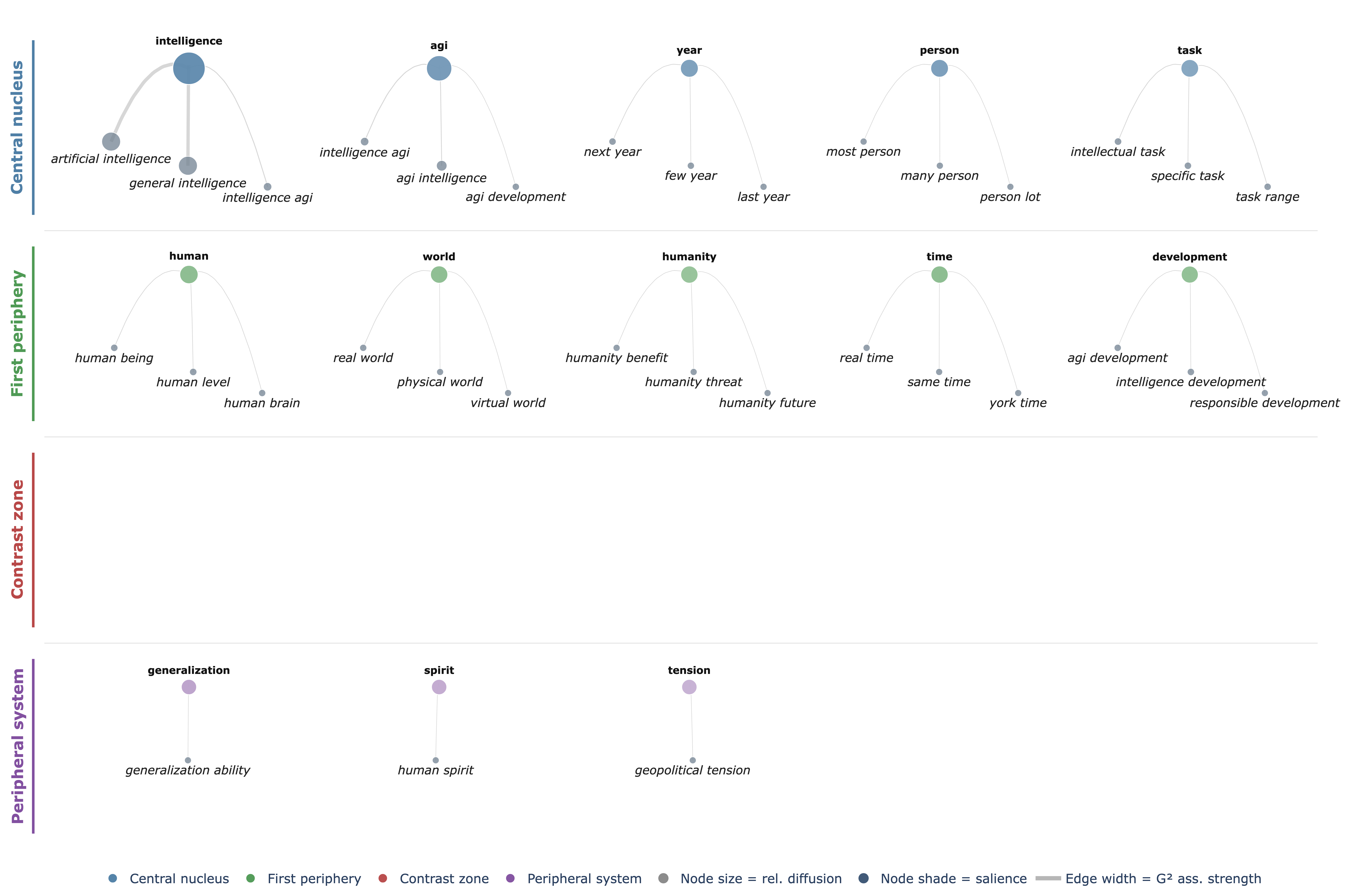
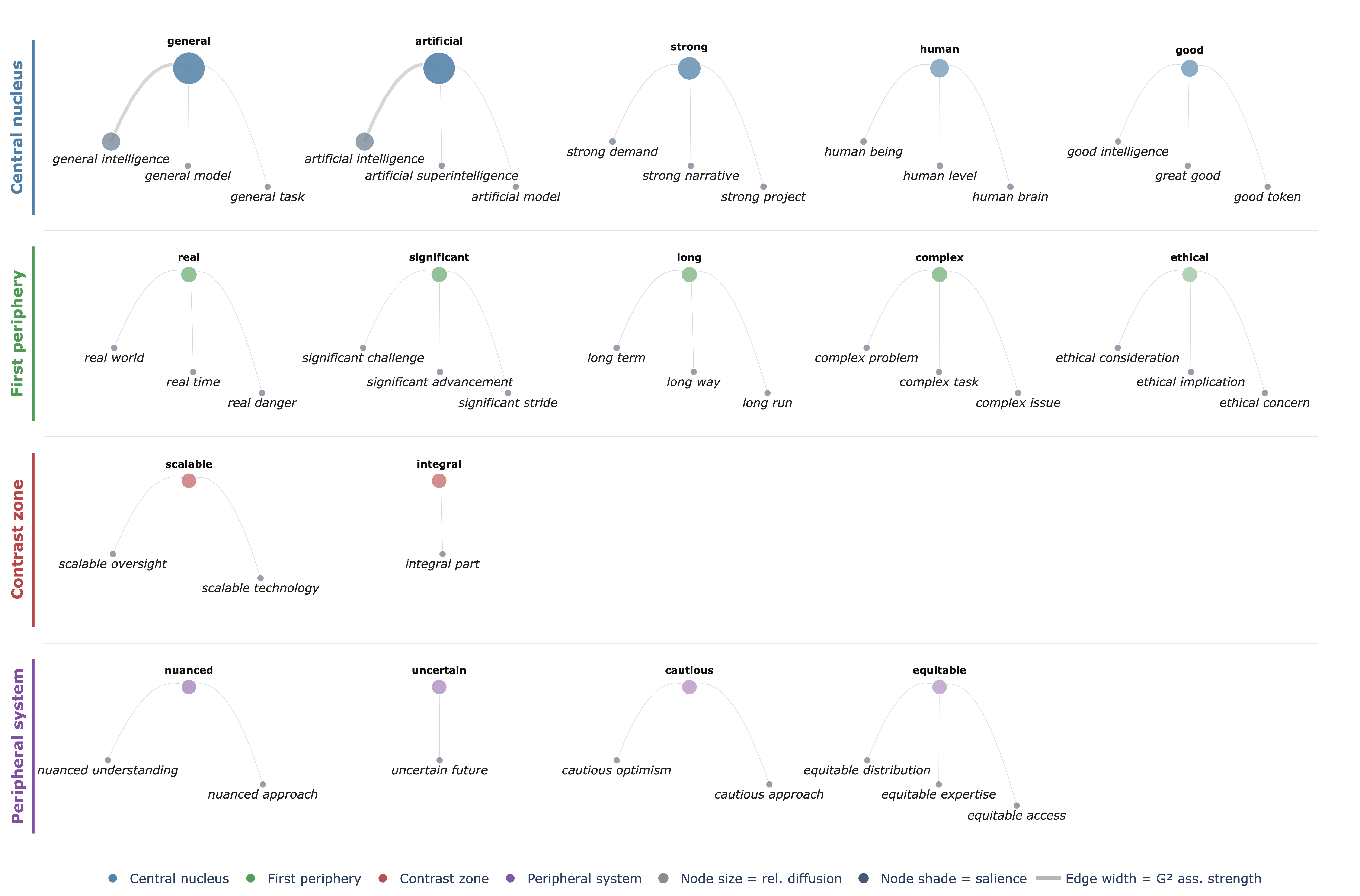
pyevoc.analysis.temporal_stabilityFour plot types: EVOC target maps (NOUN/ADJ scatter), collocation semantic trees (arc diagrams coloured by quadrant), emoji EVOC map, and temporal Sankey flow diagram. Static PNG + interactive HTML via Plotly.
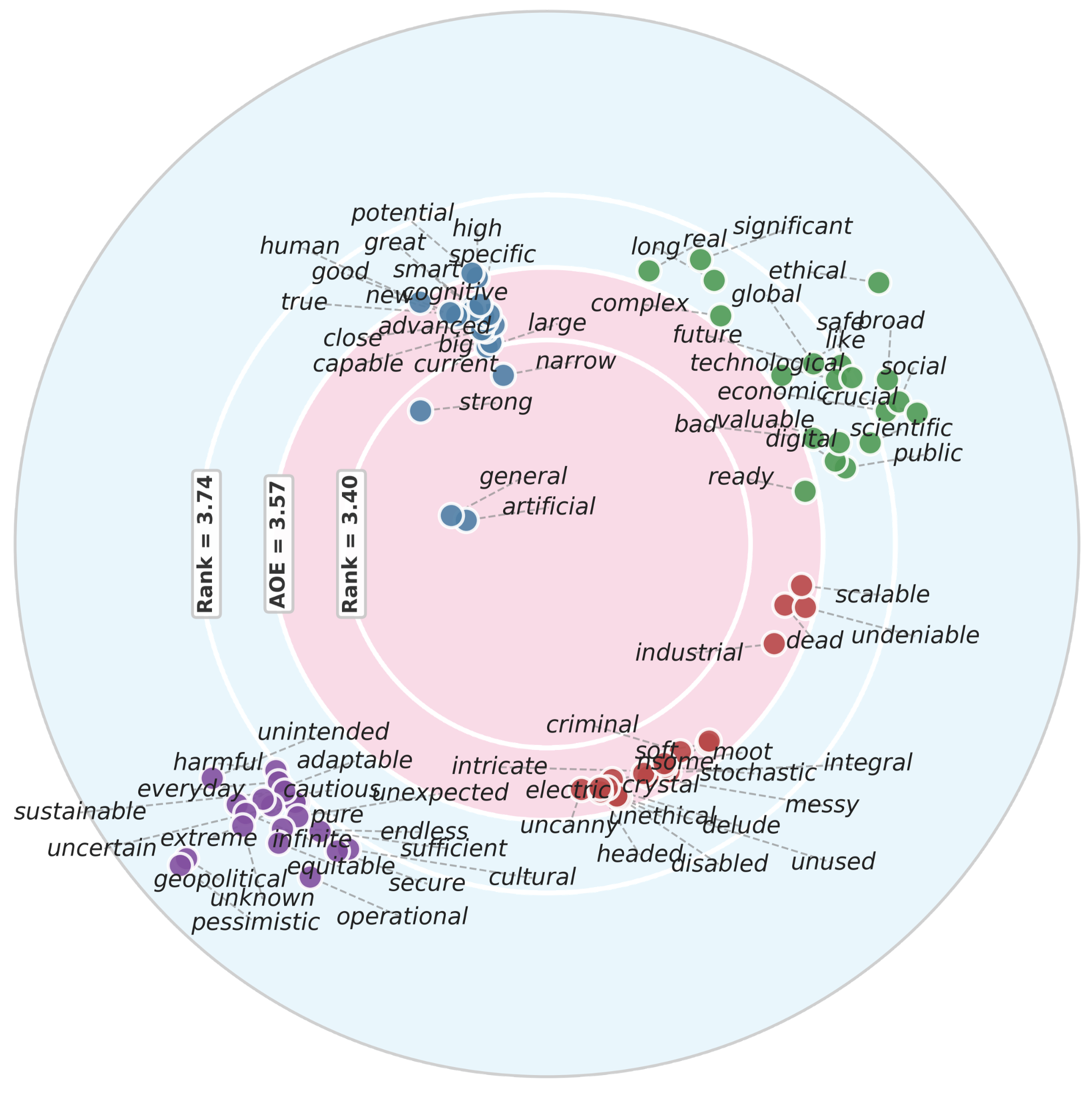
pyevoc.visualisationAll outputs below were generated using the publicly available AGI dataset (Xie & He, 2025 — 53,649 posts on Artificial General Intelligence). Click any figure to enlarge.
PyEvoc was developed alongside and applied in a peer-reviewed study to appear.